Projects
The Objective
Develop a custom e-commerce platform for purchasing and gifting curated experiences.
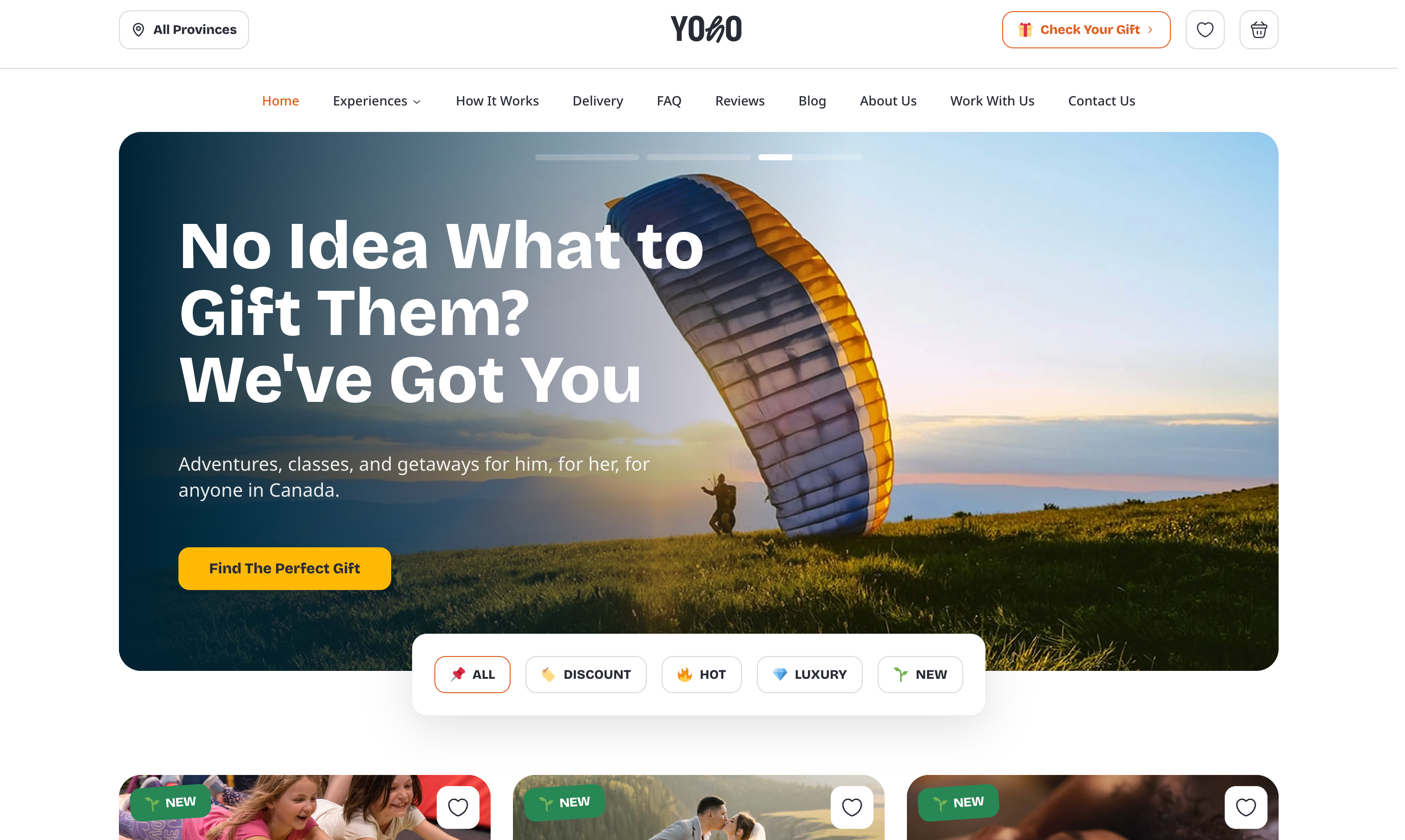
I was approached by Valerii in 2024 with an idea for an app that would let people gift curated local experiences. He called it, YOHO. He had used something similar in Ukraine and wanted to bring that concept to Canada.
What started out as a relatively simple idea turned into a much larger system.
At a high level, the platform works like a prepaid service/experience system. A user can purchase an experience as a gift, but the recipient isn’t locked into that exact option—they can exchange it for something else, and pay the difference if needed. That flexibility sounds straightforward, but it introduced a lot of complexity under the hood.
Stripe handled the initial transactions, but it doesn’t support that kind of exchange flow out of the box. I ended up building a custom system to manage credits, swaps, and price differences. That also meant implementing a custom tax layer to make sure everything stayed consistent when values changed.
I began this project solo and architected almost the entirety of the project by myself. The client hired contractors to handle some of the design details on the frontend so I could focus more on the business logic of the site close to the end. Altogether, it ended up being around 1500 commits and 275,000 lines of TypeScript.
The result is a beautiful, performant, intuitive, and unique e-commerce app that launched earlier this year.
I could go on and on about all the different development aspects of this project, so I'll keep it short! You can find some of my favourite and most challenging features below.
Landing Page
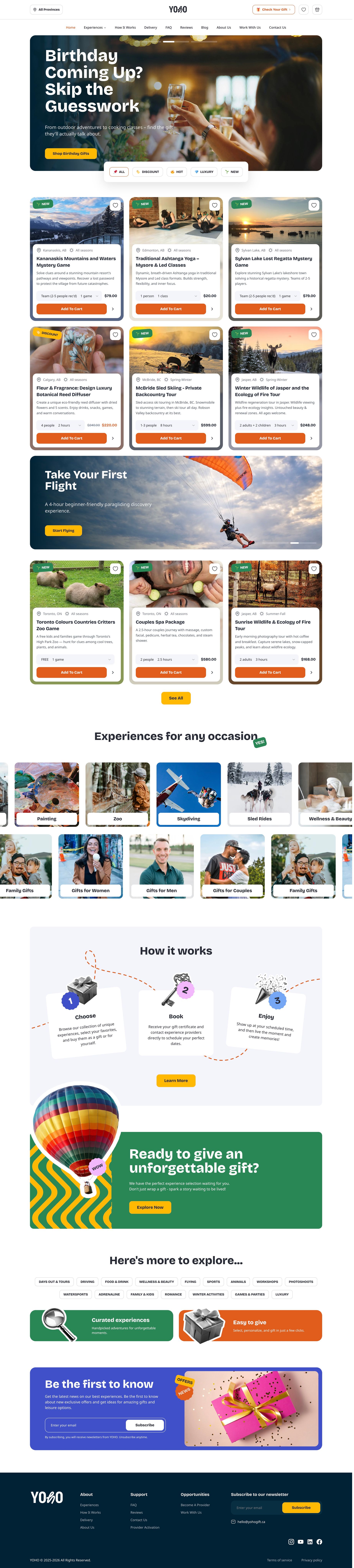
The landing page loads with a set of ten experiences, selected dynamically based on the user’s location. The goal here was to get something relevant on screen immediately without requiring any input. This meant keeping the query fast and lightweight so it didn’t block the rest of the page from rendering.
At the top, there’s a rotating slideshow for featured experiences. Further down, marquees are used to surface additional content without adding more static sections to the page. These are continuously moving, so they can show more items without increasing page length.
Several of the banner sections required custom positioning to match the layout. For example, the hot air balloon graphic overlaps with the section above it. This wasn’t something that could be handled with standard layout rules, so it required custom styling to make sure it behaved correctly across screen sizes, especially on mobile devices.
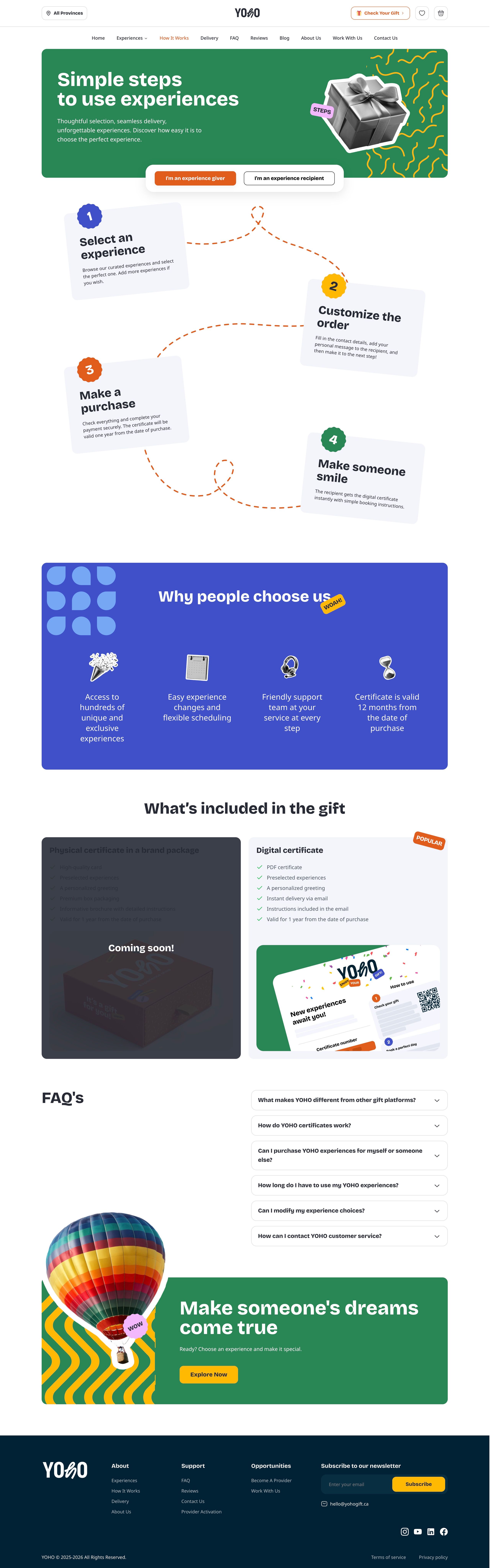
"How It Works" Page
This page looks simple, but it’s doing quite a bit behind the scenes.
Each step is positioned independently, with dotted “squiggle” connectors linking them together. Those connectors aren’t decorative images, by the way. They’re dynamically rendered elements that adjust based on layout.
By keeping everything as real DOM elements, the content can be translated properly and remains readable by screen readers. The tradeoff is that the layout becomes much harder to manage. The spacing and positioning shift across breakpoints, so the connectors need to adapt without breaking alignment or overlapping content.
There isn’t really an off-the-shelf solution for that kind of layout, so it ended up being a lot of custom logic and iteration to make sure everything held together across screen sizes while still meeting accessibility requirements.
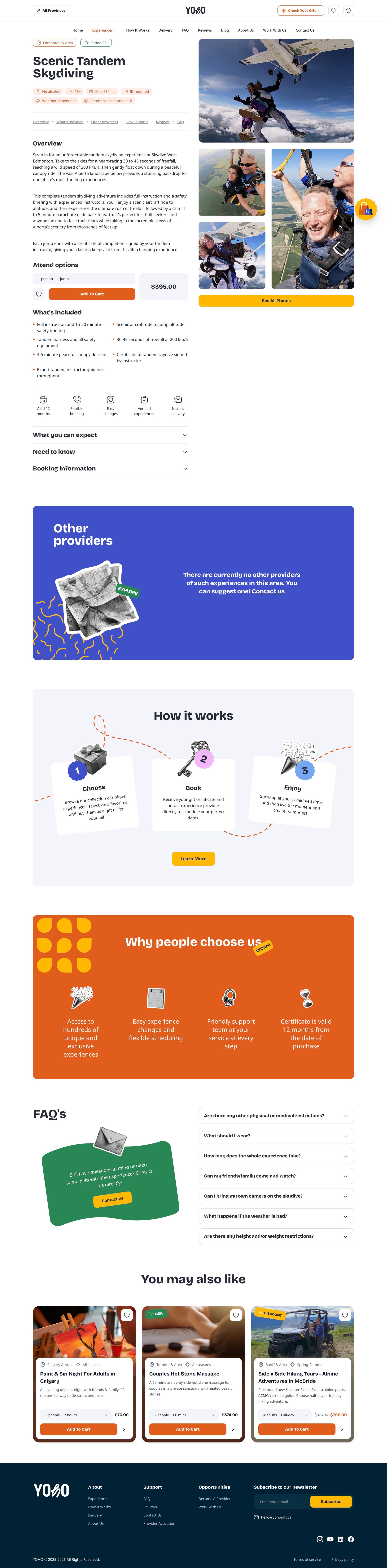
Experience Details Page
The experience page ended up carrying a lot of functionality.
The media gallery at the top works as both a lightbox and a sticky element. As you scroll, it stays in view, which helps keep context while reading through the details. At the same time, it supports a full lightbox experience so users can browse all images without leaving the page.
Routing for this page was more complex than it looks. For SEO, the URL needed to include both the region and the experience name. On top of that, the page had to adapt based on location. If someone is browsing with a specific region selected, the content reflects that. If they’re on the default “all locations” view, the page needs to make it clear that the same experience may be available in multiple places—and allow them to choose (for tax reasons).
Related experiences were handled in a few different ways. From the dashboard, experiences can be grouped under a shared category (for example, "Paint Night"), and then filtered by location to show similar offerings in the area. There’s also a separate tagging system that controls where experiences appear in navigation (like “Date Nights”), which adds another layer of organization.
For broader recommendations—like suggesting an Italian Cooking Class instead of another paint night—I used Meilisearch to surface related experiences based on content similarity. This helped make the recommendations feel less rigid and more exploratory.
Dynamic PDF Email Attachments
Email and PDF generation ended up being tightly coupled in this system.
For emails, I used React Email to build templates as actual React components. That made it easier to keep things consistent with the rest of the product and avoid dealing with raw HTML email quirks directly. Once rendered, those emails were sent through Resend, which handled delivery and gave us a clean API for triggering emails from background jobs.
Where things got more involved was the PDF generation.
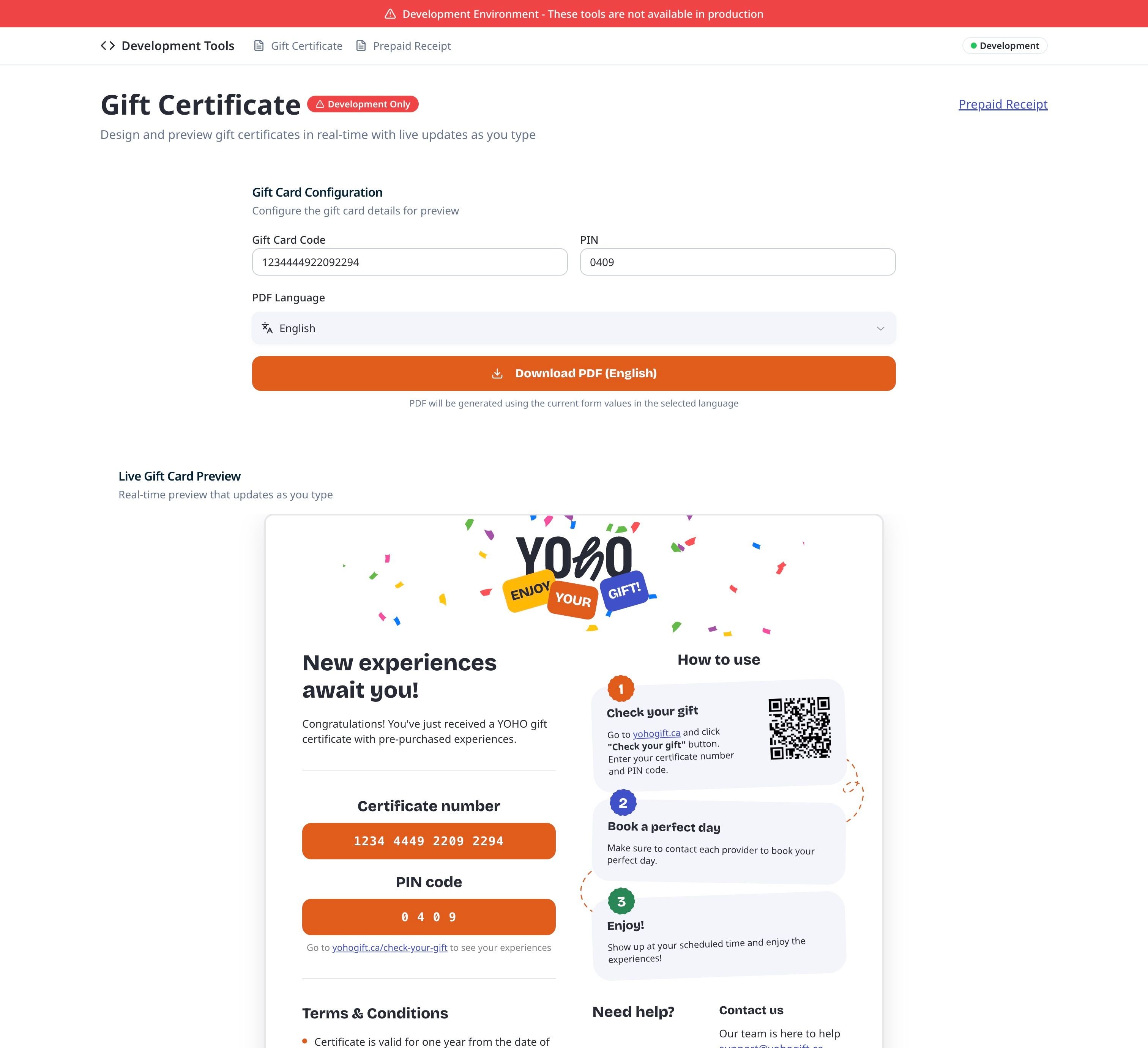
Each gift needed a dynamically generated certificate that included:
- a unique certificate number
- a PIN
- a QR code that links directly to the “Check Your Gift” page with those values pre-filled
This couldn’t be done with a static template. The content had to be rendered at runtime, based on the specific purchase.
I used Puppeteer to generate these PDFs, triggered by an Inngest job in our queuing system. Under the hood, it renders an HTML version of the certificate in a headless browser and exports it as a PDF. This gave full control over layout, fonts, and positioning, which was necessary to match the design exactly. Tools like ReactPDF did not allow us to embed custom fonts in the server-side use of the package.
One challenge with this approach is iteration speed. Without tooling, every change requires generating a full PDF through the app flow and checkout process, which is slow and difficult to debug.
To solve that, I built a custom internal preview tool. It allows developers to:
- input a certificate number and PIN
- switch between languages
- preview the PDF in real time
- download the generated file
This made it much easier to test layout changes, validate QR code behavior, and ensure everything rendered correctly before emails were sent.
It also reduced the risk of issues in production, since we could catch rendering problems early without relying on the full purchase flow.
Alecia delivered excellent work on our project. She's technically strong, dependable, and great at finding efficient solutions to complex problems.— Valerii Yanchev, founder of YOHO
With over 20 years of programming expertise, I specialize in turning complex ideas into impactful, user-focused solutions. From developing and maintaining products used by millions—like video chat platforms and exam software—to creating custom dashboards and levelling up SquareSpace, WordPress, and Wix sites, I can execute your vision from concept to completion, from frontend to backend, and everything in between.
I don’t just build software; I solve problems, streamline processes, and deliver results to maximize your online presence.